# 真人客服

DMflow的真人客服有兩種模式

* 可以透過dmflow\.chat做全渠道客服。
* 也可以導向Messenger或LINE的官方提供客服中心。

兩種各有優缺點，LINE的官方提供的功能比API多很多，例如電話、傳送檔案等都是API無法做到的，你可以選擇混用。

### 目前功能

* 真人客服支援指派以及未指派給你的Inbox
* 有提供筆記可以@其他使用者查看，使用方式為開頭打/note&#x20;

### 聯絡人

聯絡人的Inbox提供Agent以及租戶創建者可以直接聯繫DMflow客服。

### 使用者屬性

可以直接修改機器人內的記憶模板，屬性和標籤。此標籤非Agent工單標籤，目前尚未實現Agent工單標籤。

### 技能

Agent可以直接使用領域技能，例如文檔問答以及閒聊。而表單可以會開啟新的視窗，同時代入"訪客模式"的參數，你可以取得訪客建立的表單資料做回覆。

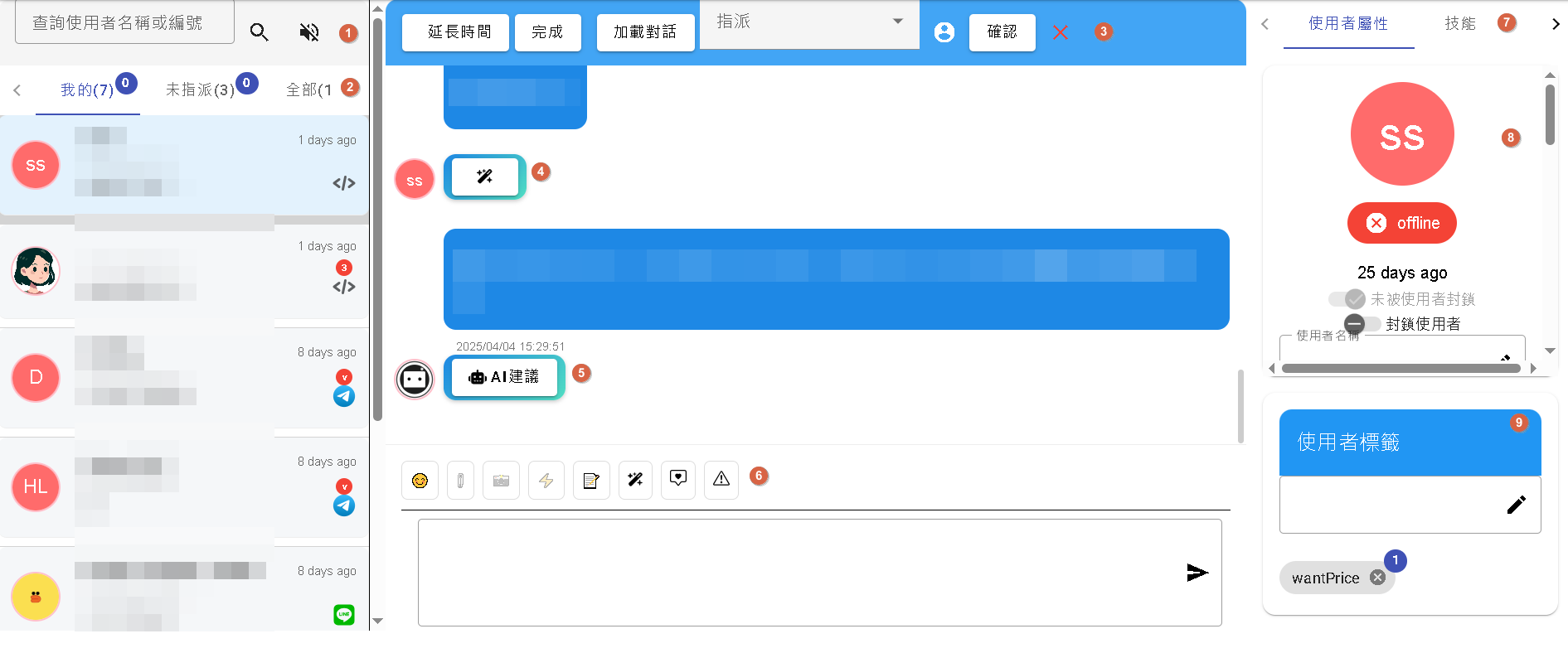
<figure><img src="/files/tlEbtBmaV9rGOKr6I7TK" alt=""><figcaption><p>ˊ真人客服圖</p></figcaption></figure>

* 1\. 搜尋功能以及開啟音訊通知，音訊通知會根據左側若有新的訪客呼叫會通知音訊。
* 2\. 可以透過我的、未指派、全部過濾使用者
* 3\. 可以延長真人客服時間、完成、加載對話(一般往上會自動加載)、指派其他訪客、關閉會將整個對話關閉(關閉後才算完成客服活動)。
* 4\. 可以透過魔法棒自動翻譯成瀏覽器語系
* 5\. AI建議會將AI怎麼回覆的步驟顯示出來
* 6\. 由左而右是**emoji**、**共用筆記**、**聊天用魔法棒**(可翻譯成其他語言)、**預設模板輸出**、**警告提醒**(<mark style="color:red;">LINE push需要額外付費、Messenger以及Instagram七天後將無法送出等</mark>)。
* 7\. 分為使用者屬性、技能、筆記以及AI建議顯示。
* 8\. **未被使用者封鎖**(用於LINE封鎖了你)，**封鎖使用者**指的是**你封鎖該訪客**，網頁聊天會及時顯示對方是否仍在線上，其他則是機器人 [機器人介紹](/chatbot/introduction.md#ji-yi-mu-ban)使用者模板的欄位。
* 9\. 查看使用者標籤

**額外注意**: <mark style="color:red;">LINE轉交真人客服後，訪客的回答會暫存reply token，短時間回覆會消耗剛剛暫存的token，這時不會使用push，若你多回答問題才會調用push。</mark>

支援LINE和Telegram群組客服，<mark style="color:red;">**但不建議使用LINE群組客服功能因為群組消耗的次數是根據你的群組人數計算**</mark>。


---

# Agent Instructions: Querying This Documentation

If you need additional information that is not directly available in this page, you can query the documentation dynamically by asking a question.

Perform an HTTP GET request on the current page URL with the `ask` query parameter:

```
GET https://docs.dmflow.chat/live-chat.md?ask=<question>
```

The question should be specific, self-contained, and written in natural language.
The response will contain a direct answer to the question and relevant excerpts and sources from the documentation.

Use this mechanism when the answer is not explicitly present in the current page, you need clarification or additional context, or you want to retrieve related documentation sections.